How to adjust the Magic Angle Setting on monitor?
Important Note: The information on this page is for Hong Kong products only. Models, sequences or settings will vary depending on location and/or where the product had been purchased. To be redirected to your local support page please click here.
Samsung Magic Angle
Samsung Magic Angle settings can be configured to obtain the optimum picture quality according to your viewing angle.
Adjusting Samsung Magic Angle Setting

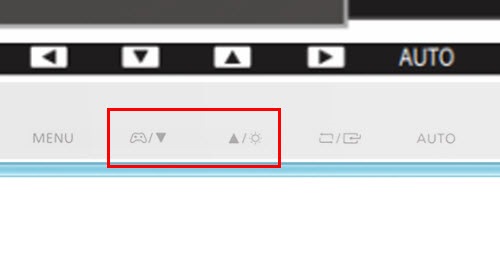


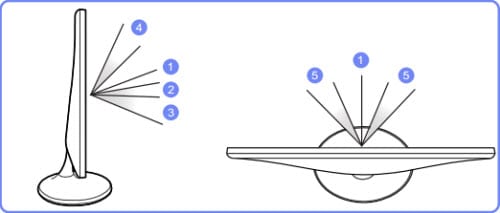
• Off: View the screen directly in front of the monitor. Labeled 1 above.
• Lean Back Mode 1: View the screen from a place slightly lower than the monitor. Labeled 2 above.
• Lean Back Mode 2: View the screen from a place lower than Lean Back Mode 1. Labeled 3 above.
• Standing Mode: View from a place higher than the monitor. Labeled 4 above.
• Side Mode: View from either side of the monitor. Labeled 5 above.
• Group View: Select this option for more than one viewer to view from places labeled 1, 4, and 5 above.
• Custom: Not available on these models. Lean Back Mode 1 will be applied by default if Custom is selected.
NOTE: Samsung Magic Angle is not available when Samsung Magic Bright is in Cinema or Dynamic Contrast mode. The menu is also not available when Game Mode is enabled.
If the above information does not match what your product is showing, you may check the User Manual for your product. If you are unable to solve the problem, please contact us for further assistance.
Thank you for your feedback!
Please answer all questions.
RC01_Static Content : This text is only displayed on the editor page