After updating S7 to OS 7.0, Resolution and Screen Brightness is worse than OS 6. Why?
Important Note: The information on this page is for Hong Kong products only. Models, sequences or settings will vary depending on location and/or where the product had been purchased. To be redirected to your local support page please click here.
From Samsung Galaxy devices based on Android OS 7.x Nougat, new feature called ‘Performance Mode’ has been applied.
Through Performance mode, user can select various device modes depending on device usage style.
It support Optimised mode that balances battery life and screen resolution for everyday use,
✧ Game mode that enhances your gaming experience by making games run more smoothly,
✧ Entertainment mode that enjoys music and videos with ultra high quality sound and enhanced images,
✧ High performance mode that helps to experience the highest quality display settings and
✧ default device setting mode is Optimised mode.
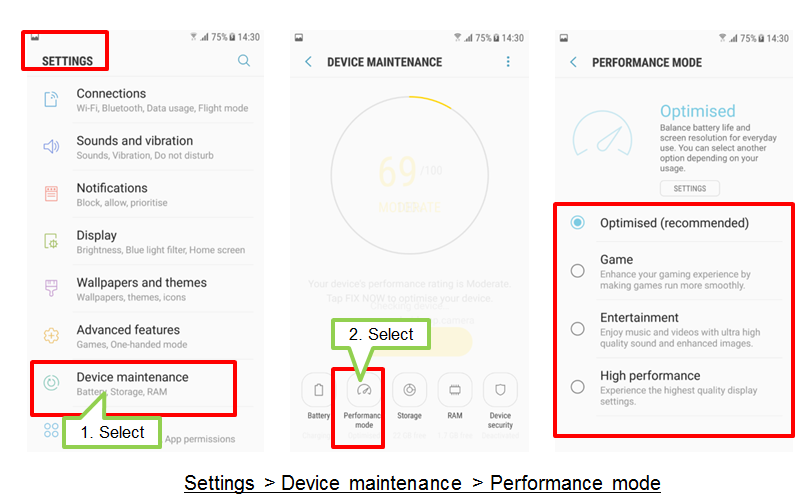
Default Optimised mode is recommended for everyday use and it supports to optimise battery life time, control device heating and improve activation speed of applications.
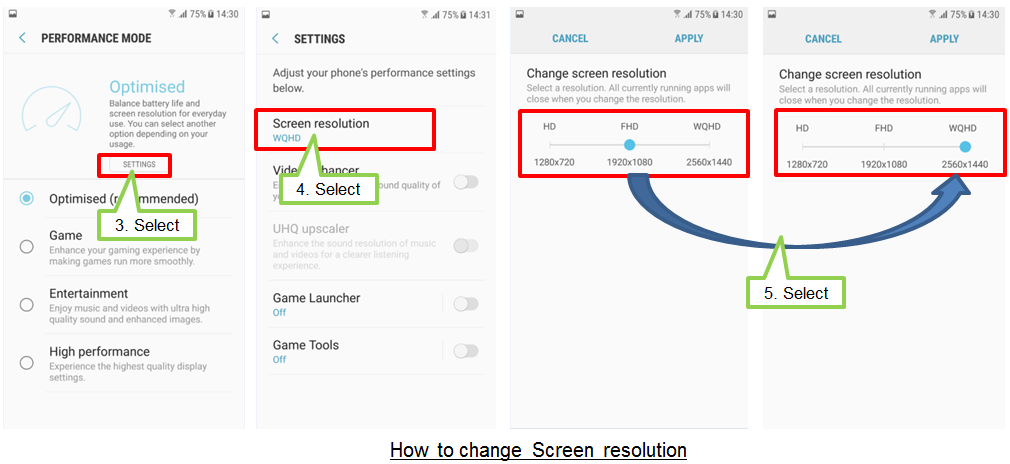
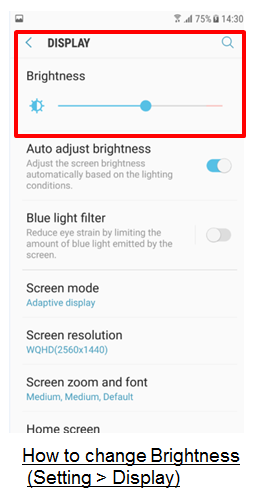
Moreover, device brightness is set to value that balances battery life and screen resolution, and Default screen resolution is set to FHD (1920x1080).
Due to this, you may feel device resolution may be worse compared with Galaxy S7/S7 edge based on Android OS 6.x Marshmallow version which supports QHD (2560x1440) for default resolution.
This is for purpose to support better device performance and you can also change to your preferred setting value depending on usage style.
However please note using a higher resolution will result in faster battery consumption.
If the above information does not match what your product is showing, you may check the User Manual for your product. If you are unable to solve the problem, please contact us for further assistance.
Thank you for your feedback!
Please answer all questions.
RC01_Static Content : This text is only displayed on the editor page