Galaxy S8: What is Samsung DeX feature?
Important Note: The information on this page is for Hong Kong products only. Models, sequences or settings will vary depending on location and/or where the product had been purchased. To be redirected to your local support page please click here.
Samsung DeX is a service that allows you to use your smartphone like a computer by connecting the smartphone to an external display, such as a TV or a monitor. You can use your smartphone’s features on a large screen conveniently by connecting an external display, keyboard, and mouse.
To use Samsung DeX feature, DeX Station (sold separately), Charger (TA), HDMI cable and Monitor are must-have peripherals.
With the DeX Station, you can connect your smartphone to a TV or a monitor, using its features on a wider screen.
You can also connect with nearby devices, such as a keyboard or mouse. To activate DeX Station, charger is required.
DeX Station
ü Multi-port dock for Samsung DeX feature
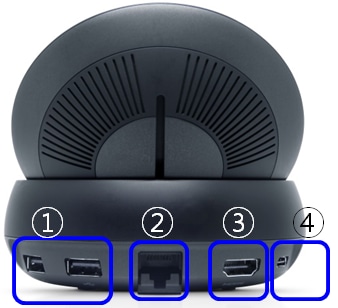
ü Spec
1) 2 USB 2.0 ports (for wired keyboard / mouse)
2) 1 Ethernet
3) 1 HDMI Out
4) 1 USB type-C Power-in port for charging
5) Cooling Fan
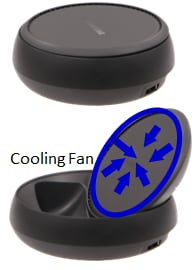
* Cooling fan prevents overheating of the device and the fan is designed with 360-degree coverage from the edge of the upper part towards the center
Pictures/ Images are for reference only.
If the above information does not match what your product is showing, you may check the User Manual for your product. If you are unable to solve the problem, please contact us for further assistance.
Thank you for your feedback!
Please answer all questions.
RC01_Static Content : This text is only displayed on the editor page