How do I Lengthen battery usage time in Galaxy Note8?
Important Note: The information on this page is for Hong Kong products only. Models, sequences or settings will vary depending on location and/or where the product had been purchased. To be redirected to your local support page please click here.
Galaxy Note 8 provides various ways to increase battery usage time.
To increase battery usage time, please follow the tips.
The quick optimization feature improves device performance through the following actions.
• Clearing some memory
• Deleting unnecessary files and closing apps running in the background
• Managing abnormal battery usage
• Scanning for crashed apps and malware

Tick apps from the apps list on App power monitor and tap SAVE POWER

Enable Optimize battery usage for individual apps.
Some functions, such as those that use mobile networks or sync data, will be restricted to save battery power.


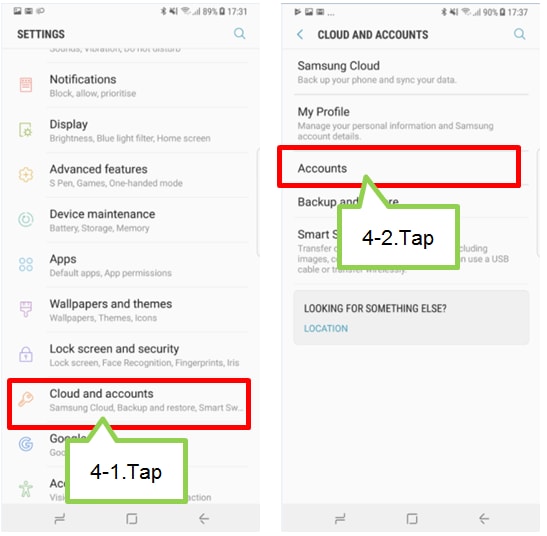
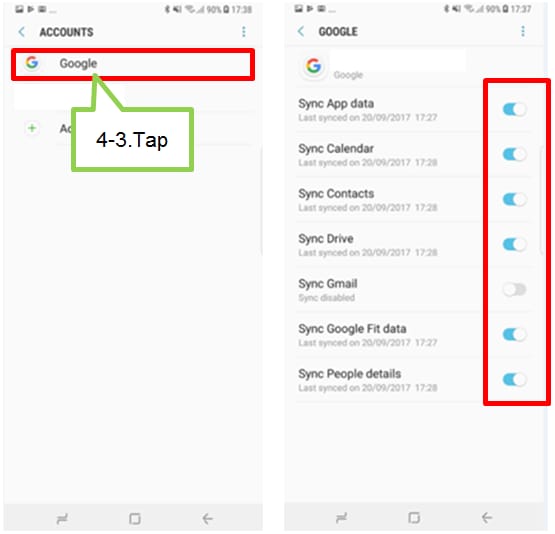
If the above information does not match what your product is showing, you may check the User Manual for your product. If you are unable to solve the problem, please contact us for further assistance.
Thank you for your feedback!
Please answer all questions.
RC01_Static Content : This text is only displayed on the editor page