How to install the SIM or USIM card on Galaxy S6 edge+? (Dual SIM model)
Important Note: The information on this page is for Hong Kong products only. Models, sequences or settings will vary depending on location and/or where the product had been purchased. To be redirected to your local support page please click here.
<Dual SIM models>
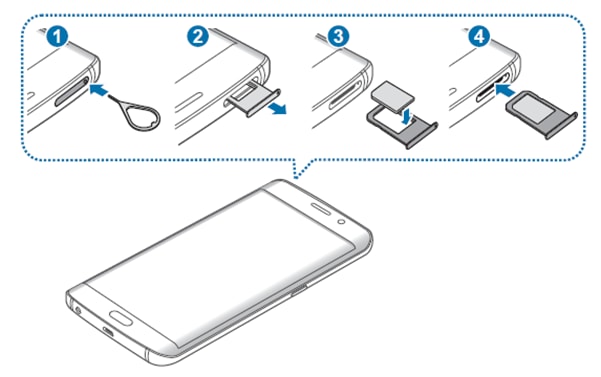
1. Insert the ejection pin into the hole on the SIM card tray to loosen the tray.
Note : Ensure that the ejection pin is perpendicular to the hole. Otherwise, the device may be damaged.
2. Pull out the SIM card tray gently from the SIM card tray slot.
3. Place the SIM or USIM card on the SIM card tray with the gold-coloured contacts facing downwards.
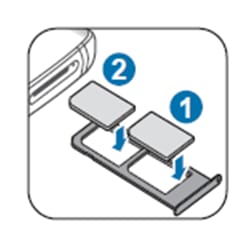
In the case of Dual SIM models, Place the primary SIM or USIM card on the SIM card tray 1 ( 1 ) and the secondary SIM or USIM card on the SIM card tray 2 ( 2 ).
Note : Use caution not to lose or let others use the SIM or USIM card. Samsung is not responsible for any damages or inconveniences caused by lost or stolen cards.
4. Insert the SIM card tray back into the SIM card tray slot.
Note : Carefully insert the SIM card tray to prevent the SIM cards from leaving or falling out of the tray
If the above information does not match what your product is showing, you may check the User Manual for your product. If you are unable to solve the problem, please contact us for further assistance.
Thank you for your feedback!
Please answer all questions.
RC01_Static Content : This text is only displayed on the editor page