Introducing the Samsung MovingStyle
Overview and main features
The Samsung MovingStyle delivers effortless mobility and versatility with its detachable, rollable design, hidden wheels, and convertible handle-kickstand that let you set up and enjoy your screen anywhere. With built-in battery power, instant Wi-Fi connectivity, and immersive Dolby Atmos and HDR 10+ picture quality, it provides a complete entertainment experience without needing a power outlet.
Touch controls, Bixby voice interaction, and Galaxy Watch gestures make navigation intuitive, while personalized widgets, Samsung TV Plus, Generative Wallpaper, and Click to Search add smart, customizable features that fit seamlessly into your daily routine.
Detachable & Rollable style
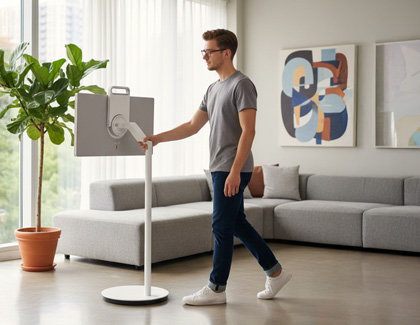
The ultra-portable design lets you create an entertainment or work setup almost anywhere. Roll it on the floor stand or carry it using the integrated handle. The stand-free mode is ideal for outdoor areas, small rooms, or any space where you want quick setup on a flat surface.
Instant viewing style
Connect with Wi-Fi for easy access to apps and content. The built-in battery lets you watch for up to 3 hours, depending on settings and usage. HDR 10+ picture quality and Dolby Atmos audio provide a clear and immersive viewing experience whether you are working or watching a movie.

- Bixby works with select TV controls.
- A Samsung Account is required for network-based smart services, including streaming apps. Without signing in, only external device connections such as HDMI are available.
- Bixby supports English (US/UK), French, Spanish, German, Italian, Chinese, and Korean, but may not recognize all accents or expressions.
- Gesture control is supported on Galaxy Watch4 and later models running Wear OS 5 or higher, and available apps and services may vary by region or change without notice.
Versatile interactive style
Use touch controls to tap, swipe, and scroll directly on the screen. You can also use Bixby voice assistant or gesture commands with a compatible Galaxy Watch for hands free control. These options give you flexible ways to interact with the screen depending on your setup and where you place it.
- A Samsung Account is required for personalized widgets, Samsung TV Plus, and other network-based smart services. Without signing in, only external device connections and supported over-the-air channels are available.
- Click to Search works with Samsung TV Plus, and Watch Next uses AI-based recommendations.
- A Samsung Account and Wi-Fi connection are required for Art Store. Monthly refreshed artworks and ambient content are included, while full catalog access requires a subscription.
Personalized style
Set up a personalized board with info widgets to support your daily routine, and explore free live TV and on demand content with Samsung TV Plus, where available. You can also add custom touches with AI features like Generative Wallpaper and Click to Search, and access additional artwork through Samsung Art Store.
Key benefits
Convenient mobility
The MovingStyle is designed to move easily between rooms and adapt to different viewing needs. The rollable floor stand uses hidden wheels for smooth movement and supports adjustments such as tilt, swivel, pivot, and height, allowing you to position the screen comfortably in a variety of spaces. When detached from the stand, the built-in handle converts into a kick-stand so you can quickly set up the screen on a table, the floor, or any flat surface. Its lightweight design makes it simple to carry and place where you need it.
The built-in battery provides up to 3 hours of use, depending on settings and usage, so you can enjoy the screen without relying on a power cable. You can recharge it using the included adaptor or a compatible portable battery through the USB-C connection, giving you added flexibility when using the screen away from a power outlet.
Touch Interaction
The MovingStyle supports intuitive touch control, allowing you to tap, swipe, drag, and scroll directly on the screen. Because the device is designed for close-range use, you can interact with the interface easily without needing a remote. Touch control works not only for basic navigation but also with compatible streaming apps, screen mirroring, casual games, and creative tools such as sketching or writing.
The touch experience is fast and responsive, with support for high-precision input and a 120Hz refresh rate for smoother movement. You can mirror a laptop or mobile device for additional control options, and access web content, e-books, or drawing apps using simple touch gestures.
Vision AI
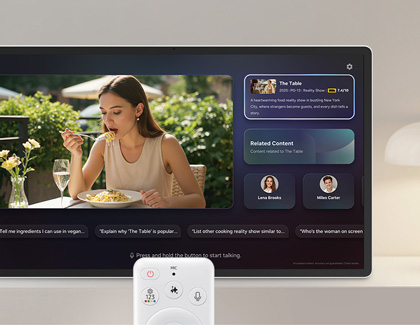
The MovingStyle includes AI features that help you get more from what you watch and how you use the screen. With Microsoft Copilot built in, you can ask general questions, get quick answers, and receive viewing suggestions using everyday language. Copilot can help when you need information about what you are watching or when you are looking for something new to play next.
AI also supports features like Click to Search, which identifies the people or content on screen and provides related details or recommendations without requiring another device. In addition, AI Picture and AI Sound automatically adjust brightness, sound settings, and dialogue clarity based on your surroundings and the type of content you are viewing, helping maintain a comfortable and optimized experience throughout the day.
Now brief
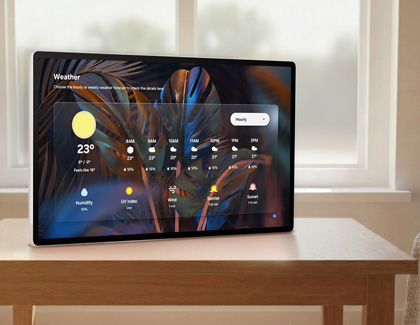
Now Brief allows MovingStyle to display useful information even when the screen is off. Instead of showing a blank screen, it can present items such as the time, weather, calendar reminders, and other at-a-glance details. MovingStyle supports both widget and full-screen layouts, using a UI designed specifically for quick viewing.
The screen can turn on automatically using motion detection or respond to voice commands, touch, or the remote. With options like weather updates, music dashboards, and personalized cards, Now Brief helps you see important information easily as part of your daily routine.
Art / Ambient
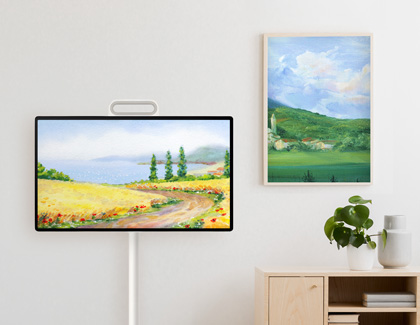
The MovingStyle lets you customize the screen with artwork, ambient visuals, and AI-generated images that match your mood or surroundings. The Art Store provides access to curated collections of modern art, photography, and design pieces, with regularly updated selections. You can display artwork in rotation or choose specific pieces, and even non-subscribers can enjoy a selection of refreshed content.
Generative Wallpaper allows you to create personalized backgrounds using AI. By choosing a theme or keyword, you can generate and save multiple images and set them as wallpaper. These options make it easy to turn the screen into a decorative element that fits your space and style.
Multi Control
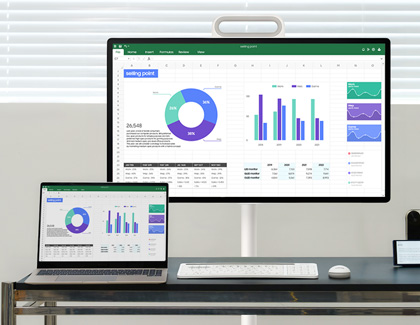
Multi Control allows you to connect multiple devices to The MovingStyle and use them together as one workspace. Using Wi Fi Direct, the screen can link to up to four supported devices such as a phone, tablet, or PC without requiring the same router. This makes it easier to work across devices and manage files without cables or extra setup.
Once connected, you can drag and drop files directly from one device to another, similar to using dual monitors. This helps you view, move, and organize content across your Galaxy devices while keeping your workflow consistent on a larger screen.
Specifications
With its immersive display, built in battery, and versatile design, the Samsung MovingStyle gives you a flexible viewing experience for work, entertainment, and everyday use. You can review the full specifications below.
- Display: 27 inch, QHD (2,560 x 1,440), IPS panel, 120Hz, 5ms, Touch Interaction
- Processor: NQ4 AI Gen2 Processor, HDR, HDR 10+
- Audio: Dolby Atmos, OTS Lite, Q-Symphony, 10W, 2CH
- Battery: Max 3hrs, 69W
- Weight: 56.7lb (with stand), 11.5lb (without stand)
- Dimensions: W:628.3 x H:368.2 (without stand), W:628.3 x H:1272.3 (with stand)
Frequently asked questions
How is The MovingStyle different from using a monitor with a conventional moving stand?
Although monitors can be placed on movable stands, they still rely on external devices such as a PC or streaming box. The MovingStyle is an all-in-one screen with a built-in battery, speakers, operating system, and touch interface, so you can use it independently without additional hardware. It also offers better portability with hidden wheels and cable-free use for several hours, while a monitor with a movable stand must remain plugged in.
How is The MovingStyle different from The Freestyle or The Premiere 5?
All three products support portable viewing, but they serve different purposes. The MovingStyle is a portable display with a built-in battery, touch screen, and consistent image quality suitable for indoor and semi-outdoor areas. The Freestyle is an ultra-light projector designed mainly for casual outdoor projection. The Premiere 5 is a premium home cinema projector with 4K projection that requires a stable indoor setup.
In short, The MovingStyle is a self-contained interactive screen, while The Freestyle and The Premiere 5 are projectors designed for specific viewing environments.
What are the key differences between The MovingStyle and competing products?
The MovingStyle includes an integrated kick-stand that lets you detach the screen and place it directly on a desk without extra accessories. It also supports a 120Hz refresh rate for smoother motion when watching content or navigating the interface. In addition, Samsung's software, long-term update policy, and smart features help enhance usability and maintain performance over time.
Contact Samsung Support


